
If you opened your account this October and found a Search campaign you never touched now carrying an AI Max label, you are not imagining it. Between September 1 and September 30, 2026, Google moved Search campaigns that used automatically created assets or the campaign-level broad match setting over to AI Max. Nobody asked for your permission, and there was no big banner announcing it.
This Google Ads tutorial is written for people who run or want to run Search campaigns and need a clear picture of what happened. We will cover what AI Max is, which campaigns were touched, how to check your own account in five minutes, and what to fix first. No jargon walls, no panic.
Quick answer
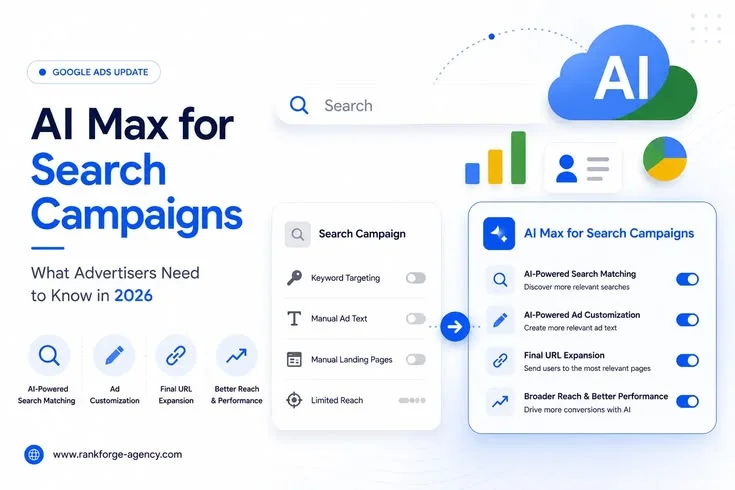
AI Max for Search is a set of Google's AI features that sits on top of your existing Search campaigns. It widens the searches your ads can match, rewrites ad text for each query, and can send people to a better landing page. In September 2026, Google automatically upgraded campaigns using automatically created assets or campaign-level broad match to AI Max. Dynamic Search Ads follow in February 2027.
What Is AI Max for Search? A Plain-English Google Ads Tutorial Think of AI Max as a smart assistant that Google bolts onto a normal Search campaign. Your campaign, budget and bidding stay where they are. What changes is how much freedom Google has to decide which searches trigger your ad, what the ad says, and where the click lands.
AI Max for Search reached general availability in April 2026, after a beta period in which advertisers could switch it on voluntarily. The September change is the moment Google stopped waiting for volunteers. Google's own direction is clear: Search is becoming a machine-assisted channel, and Google automation is the default way to run it.
Three controls make up AI Max, and understanding them is half the battle

• Search term matching lets Google match your ads to searches that are related to your keywords and landing page, even when the exact words never appear in your keyword list. • Text customization lets Google generate and adjust headlines and descriptions so the ad reads closer to what the person typed. This is the feature Google used to call automatically created assets. • Final URL expansion lets Google send a click to a different page on your site if it thinks that page fits the query better. It only works when text customization is on.
What Changed in September 2026: The Timeline
The rollout was announced months ahead, on April 15, 2026, and Google followed up with an in-account notice on August 5. Many small advertisers never saw either, which is why so many people are only now noticing the change. Here is the sequence as it has been reported.
Google said campaigns would be migrated in place using equivalent AI Max settings, so the upgrade was designed to mirror your old setup rather than rebuild it. In practice, "equivalent" still hands Google more room than you had before, which is why a check-up matters.
Which Campaigns Were Upgraded, and What Got Switched On
Two legacy settings triggered the September upgrade, and each one produced a slightly different result.
Two points trip people up. First, Dynamic Search Ads were not part of the September wave. Second, new Search campaigns now start with AI Max turned on by default, so a campaign you built last week may already be running it even though you never upgraded anything. Several industry write-ups also describe the upgrade as having no genuine opt-out, with the only real escape being to disable the triggering feature before the deadline. That window has now closed for most accounts, so the practical question today is how to manage AI Max, not how to avoid it.
Google Ads Tutorial: How to Check Whether Your Campaign Was Upgraded
You do not need an agency for this. Set aside ten minutes and walk through your account like this.
- Open your account. Sign in and open the Campaigns view. Filter to Search campaigns only.
- Check the AI Max settings. Look in the campaign settings for an AI Max section. If it shows search term matching or text customization as on, the upgrade reached you.
- Review change history. Open the Change history and filter by date for September 2026. System-made changes appear there, and this tells you exactly when your campaign switched.
- Compare performance. Compare the four weeks before and the four weeks after the change. Look at cost per conversion, conversion rate, impression share and total spend.
- Read the search terms. Open the search terms report and read the actual queries. This single report tells you more about AI Max than any dashboard summary.
Menu names move around in Google Ads fairly often, so if a label looks different in your account, search the Help Center for the current wording rather than assuming something is missing.
Why Google Is Pushing AI Max
Google's reasoning is simple. People now type longer, messier, more conversational searches, and AI features in Search answer them in new ways. Exact keyword lists struggle to keep up. Google says AI Max finds converting searches that your keywords would have missed, and early adopters have reported more conversions at similar efficiency, though results vary a lot by account and industry.
There is also a platform reason. Fewer legacy features means fewer systems to maintain. Campaigns that use AI Max are also eligible to appear in newer placements such as AI Mode, which gives Google another reason to fold everyone into one structure.
None of this makes AI Max bad. It makes it powerful and opinionated. Used with good data and clear guardrails, it can find customers you would never have found by hand. Used on autopilot with weak conversion tracking, it can burn budget on searches that sound relevant but never buy.
The Honest Pros and Cons
What works in your favour
• Reach expands into long, specific searches your keyword list missed. • Ad text adapts to each query, which can lift click-through rate. • Less manual work on building huge keyword lists and ad variations. • Landing page matching can send visitors to a more relevant page.
What can hurt you
• Loosely related queries can slip in and waste spend. • Generated headlines may drift from your brand voice or make claims you cannot support. • Reporting is thinner than the old keyword-by-keyword view, so diagnosing problems takes more effort. • Brand and non-brand traffic can blur together and flatter your results.
What Happens to Dynamic Search Ads
If you run Dynamic Search Ads, you have a little more time, but not much. Google has said Dynamic Search Ads campaigns will migrate to AI Max in February 2027, with reminders arriving before that. Reports differ on exactly when you lose the ability to create new Dynamic Search Ads campaigns, with some sources pointing to January 2027, so confirm the current rule inside your own account.
My advice is to treat the next few months as a free rehearsal. Pick one Dynamic Search Ads campaign, upgrade it voluntarily on your own terms, and watch it closely. When February arrives, you will already know how your account behaves under AI Max instead of finding out the hard way.
Broad Match Keywords After the Upgrade
Broad match keywords are not going away. What changed is the campaign-level broad match setting, which Google folded into AI Max as search term matching. Keyword-level broad match still exists, and it works best when paired with Smart Bidding and strong conversion data.
The mental shift is this: in the old model, your keywords decided who saw your ad. In the AI Max model, your keywords, your landing pages and your assets together feed Google a picture of your business, and Google decides. That is why the quality of your website copy and your conversion tracking now matters as much as your keyword list.
Google Ads Tutorial: A 7-Step Post-Upgrade Optimization Checklist
Once you know which campaigns were upgraded, work through these steps in order. They are the same ones I would follow on a client account.
- Fix conversion tracking first. AI Max learns from conversions, so confirm your conversion actions are firing correctly and that you are counting only the actions that matter, such as leads or purchases rather than page views.
- Audit your landing pages. Check your final URLs and any expansion settings. If you sell different products on different pages, decide whether you want Google choosing the landing page.
- Build your negatives. Add negative keywords for anything irrelevant that appears in the search terms report, and add account-level exclusions for brand safety topics.
- Control brand traffic. Exclude or separate brand terms so branded searches do not inflate the apparent success of the campaign.
- Review the ad text. Read every generated headline. Turn off or restrict anything that is inaccurate, off-brand or legally risky, and add your own strong assets so Google has better material to work from.
- Be patient with learning. Give the campaign two to four weeks before judging it. Changing settings daily resets the learning and muddies your data.
- Run a clean test. Use a campaign experiment to compare AI Max on and off where possible, so decisions come from your data and not from Google's case studies.
Common Mistakes to Avoid
• Panicking in week one. A single week of bad numbers after any big automation change is normal. Judge on a proper window. • Setting it and forgetting it. Treating AI Max as hands-off is the fastest route to wasted budget. Weekly search term reviews are the minimum. • Feeding it bad data. If your conversion tracking counts junk, the AI will optimize for junk, very efficiently. • Starving the budget. Chasing every impression with small budgets spreads thin. Make sure the daily budget can support wider matching. • Assuming one setup fits all. Not every goal suits it. Very tight, high-risk or compliance-heavy accounts may need more control.
What This Means If You Are Learning Digital Marketing
Here is the bigger lesson. Ten years ago, a Google Ads specialist won by building the cleverest keyword list. In 2026 the winners are the people who can supply the best signals: clean conversion data, sharp landing pages, thoughtful negatives and honest testing. The platform handles the matching; humans handle the judgment.
That is exactly why hands-on practice beats theory. Reading about AI Max helps. Running a live campaign, watching the search terms roll in and making the call on what to block is what turns a learner into a hire-ready marketer.
Want to learn this properly? AcadVizen's digital marketing training in Jayanagar, Bengaluru, covers Google Ads, SEO and AI-driven marketing with live campaigns and mentor feedback. You can explore the course and enroll at https://enroll.acadvizen.com/.
Frequently Asked Questions
What is AI Max in Google Ads?
AI Max for Search is a group of AI features inside Google Search campaigns. It adds search term matching, text customization and final URL expansion, so Google can match your ads to more searches, tailor the ad copy and choose a suitable landing page.
What did Google change in September 2026?
From September 1 to 30, 2026, Google automatically upgraded Search campaigns that used automatically created assets or the campaign-level broad match setting to AI Max, migrating them in place with equivalent settings.
Can I opt out of the AI Max auto-upgrade?
Reports describe no genuine opt-out. Advertisers could avoid the upgrade only by turning off the triggering feature before it happened. Now that the rollout has passed, you manage AI Max through its individual controls and exclusions.
Did the upgrade affect Dynamic Search Ads?
Not in September. Dynamic Search Ads campaigns are scheduled to migrate to AI Max in February 2027, and Google has been showing prompts that let you upgrade earlier.
Will AI Max increase my costs?
Not automatically. It can widen the searches you appear for, which may raise spend if budgets are generous and negatives are thin. Results depend on your conversion tracking, budget and how closely you monitor the search terms report.
How do I know if my campaign uses AI Max?
Open the campaign settings and look for the AI Max section, then check the change history for system changes dated September 2026. If search term matching or text customization shows as on, AI Max is active.
Are broad match keywords still available?
Yes. Keyword-level broad match is still available. What was folded into AI Max is the campaign-level broad match setting, which now operates as search term matching.
Is AI Max good for small businesses?
It can be, especially for businesses with reliable conversion tracking and a clear website. Small budgets and weak tracking are the main risks, so start with careful monitoring and a clean test.
How long should I wait before judging AI Max results?
Plan on two to four weeks of stable settings. Early volatility is normal while the system learns, and constant edits make the data harder to read.
Where can I learn a complete Google Ads tutorial in Bengaluru?
AcadVizen runs digital marketing courses in Jayanagar, Bengaluru, with practical Google Ads training. Details and enrollment are at https://enroll.acadvizen.com/.
Final Thoughts
The September 2026 upgrade is one more step in a long move toward Google automation, and it will not be the last. The right response is neither blind trust nor resistance. Check which campaigns changed, protect your data quality, keep a tight grip on negatives and brand traffic, and test before you conclude anything.
If you remember one thing from this Google Ads tutorial, make it this: the AI can only be as smart as the signals you feed it. Get those right, and AI Max becomes a useful teammate instead of a surprise on your invoice.